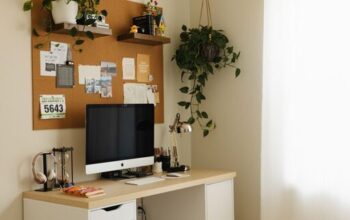
Creating a cozy and productive home office space is more important than ever. With many people working from home, having a dedicated area that combines comfort and efficiency can make a big difference in your daily workflow and well-being. Whether you have a small corner or a separate room, these tips will help you design an inviting and effective workspace tailored to your needs.
Why a Cozy and Productive Workspace Matters
An enjoyable home office encourages focus, reduces stress, and can even boost creativity. When your space is comfortable and well-organized, work feels less like a chore and more like a rewarding routine. On the other hand, a cluttered or uncomfortable setup can hinder productivity and lead to frustration.
Choose the Right Location
Your home office should be in a quiet area, away from heavy traffic and distractions. If possible, pick a spot with natural light—it helps improve mood and energy levels. This could be near a window or another bright area of your home.
If space is limited, consider how you can divide a room using furniture or screens to create a distinct work zone.
Invest in Comfortable Seating and Desk
A supportive chair is essential. Look for one with adjustable height and lumbar support to keep your posture healthy, especially during long work hours. Pair your chair with a desk that fits your work style—whether it’s a large surface for multiple screens or a compact desk for writing.
Standing desks or adjustable desks can add variety to your workday, allowing you to switch between sitting and standing.
Optimize Lighting
Good lighting reduces eye strain and keeps you alert. Use a mix of natural and artificial light. Place your desk near natural light if possible, but avoid glare on your screen.
For artificial lighting, a desk lamp with adjustable brightness is helpful for detailed work or evening hours.
Keep Your Desk Organized
An organized desk helps clear your mind and lets you focus. Use storage solutions like trays, filing boxes, or drawer organizers to keep supplies and documents tidy.
Cable management tools, such as clips or sleeves, prevent cords from tangling and create a cleaner look.
Personalize Your Space
Add personal touches that make your workspace inviting without causing distraction. This might include plants, artwork, or photos. Plants are especially great as they improve air quality and add a calming natural element.
Choose colors and decor that uplift your mood—soft colors often promote calm, while brighter hues can energize.
Minimize Noise and Distractions
Noise-cancelling headphones or white noise machines can help if your home is noisy. If possible, establish boundaries with family or roommates about your work hours to reduce interruptions.
Use Technology Wisely
Keep essential tech tools accessible but avoid cluttering your space with devices you don’t often use. Invest in a good quality keyboard, mouse, and monitor for comfortable use.
Backup your work regularly and keep your software updated to prevent interruptions.
Take Breaks and Move Around
A cozy workspace also means a healthy one. Remember to take short breaks, stretch, and move away from your desk to refresh your mind and body.
Consider adding a small mat or space nearby for simple stretches or light exercise.
Maintain Your Workspace Daily
At the end of each day, spend a few minutes tidying your desk and organizing papers. A clean start each morning can help you stay productive and motivated.
—
Creating an inspiring home office doesn’t mean you need a full renovation. With a few thoughtful adjustments, you can build a workspace that feels both cozy and highly productive. These tips aim to guide you in developing a space that supports your best work while feeling like a pleasant place to spend time.