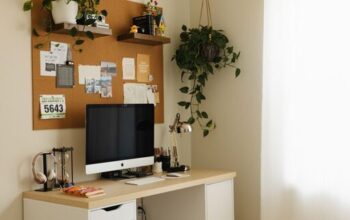
Creating a home office that is both cozy and functional can significantly improve your comfort and productivity, especially as many people continue to work remotely or spend more time on personal projects. A well-designed workspace doesn’t just look inviting; it supports focus, reduces stress, and helps you manage your workday more efficiently. Here are practical tips to help you create a home office space where you can feel at ease and get things done.
Choose the Right Location
Find a Quiet Spot
Selecting a quiet area in your home minimizes distractions. Ideally, this should be a room or a corner away from high traffic zones like the kitchen or living room. If space is limited, consider using partitions or room dividers to create a distinct office nook.
Consider Natural Light
Natural light boosts mood and energy. Position your desk near a window if possible to benefit from daylight. If natural light is limited, use bright, adjustable lighting to reduce eye strain.
Invest in Comfortable and Supportive Furniture
Ergonomic Chair and Desk
An ergonomic chair with proper lumbar support and an adjustable height desk is essential for comfort during long work sessions. Your chair should encourage good posture, and your desk should allow your arms to rest comfortably at a 90-degree angle when typing.
Multi-Functional Furniture
In smaller spaces, opt for furniture that offers storage or can be folded away easily. Desks with built-in shelves or drawers keep supplies organized and within reach.
Create an Organizational System
Use Storage Solutions
Clutter can be distracting and stressful. Utilize shelves, filing cabinets, or desk organizers to store documents, supplies, and electronics neatly.
Implement Cable Management
Tangled cables not only look messy but can also be a hazard. Use cable clips, sleeves, or under-desk trays to keep cords tidy and out of sight.
Personalize Your Space
Add Comforting Textiles
Incorporate soft elements like area rugs, cushions, or a cozy throw blanket to add warmth to your space. These small touches make the office more inviting and help reduce stress.
Decorate With Plants and Artwork
Indoor plants improve air quality and offer a calming influence. Choose low-maintenance options like succulents or snake plants. Artwork or motivational quotes can inspire creativity and make the space feel uniquely yours.
Optimize Technology Setup
Use Quality Equipment
Investing in a reliable computer, monitor, keyboard, and mouse can improve workflow. Consider a second monitor if you often multitask or manage many documents.
Organize Your Tech Gadgets
Keep your devices charged and at hand with charging stations, and ensure your Wi-Fi signal is strong enough for smooth video calls or downloads.
Manage Lighting and Ambiance
Layer Lighting
Combine natural light with task lighting (like desk lamps) and ambient lighting (such as floor lamps or overhead lights) to reduce eye strain and create a cozy atmosphere.
Control Noise Levels
If noise is an issue, use noise-cancelling headphones, white noise machines, or soft background music to maintain focus.
Establish Boundaries and Routine
Define Work Hours
Set clear start and end times for your workday to maintain work-life balance. This habit helps your brain associate the home office with productivity rather than leisure.
Keep the Space Work-Only
Avoid using your home office as a place for hobbies or casual activities. Keeping it dedicated to work helps reinforce focus and discipline.
Maintain Cleanliness and Comfort
Regular Tidying
Make it a habit to tidy your workspace daily. A clean environment reduces stress and increases efficiency.
Keep Essentials Accessible
Arrange frequently used items within arm’s reach, but store less used materials away to keep your desk clutter-free.
—
By following these tips, your home office can become a place that not only supports your professional needs but also feels welcoming and inspiring. Remember, creating a cozy and functional workspace is an ongoing process. Feel free to adjust your setup as your needs change to maintain a comfortable and productive environment.