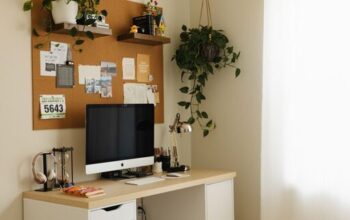

Creating a productive home workspace is essential for maintaining focus and efficiency when working remotely. Whether you have a dedicated room or a small corner in your home, setting up an environment that supports your work style can make a big difference. In this post, we’ll explore practical tips to help you create a home workspace that encourages productivity and comfort.
Choose the Right Location
Find a Quiet Spot
Selecting a location with minimal distractions is key. Try to choose a space away from heavy foot traffic, noisy appliances, or areas where family members gather frequently. This helps you concentrate better and reduces interruptions.
Prioritize Natural Light
If possible, set up near a window. Natural light boosts mood, reduces eye strain, and keeps you alert throughout the day. Position your desk so the light doesn’t create glare on your screens.
Invest in Ergonomic Furniture
Select a Supportive Chair
Since you’ll spend hours sitting, invest in a chair that provides good lumbar support and adjustable height. Comfortable seating prevents back pain and helps maintain good posture.
Use a Suitable Desk
Choose a desk that fits your space and has enough surface area for your computer, notebooks, and other tools. Adjustable desks that allow sitting and standing options can add flexibility to your routine.
Organize Your Workspace Efficiently
Declutter Regularly
Keep only essential items on your desk to minimize distractions. Use trays, file holders, or drawers to store papers and supplies neatly.
Use Cable Management
Tangled cords can look messy and disrupt your workspace. Use clips, sleeves, or boxes to organize cables and keep them out of sight.
Optimize Your Technology Setup
Invest in Reliable Equipment
Ensure your computer, monitor, keyboard, and mouse are in good working order and suited to your tasks. A second monitor can improve productivity for tasks that require multitasking or comparing documents.
Set Up a Stable Internet Connection
A fast and stable internet connection is crucial for video calls, online collaboration, and research. Consider using a wired connection or a Wi-Fi range extender if your signal is weak.
Create a Personalized Environment
Add Plants or Artwork
Decorate your space with plants or artwork that inspire you and create a pleasant atmosphere. Plants can improve air quality and add a touch of nature.
Control Lighting and Temperature
Adjust lighting to fit the time of day and your activities. Use task lighting for focused work and ambient lighting to keep the room comfortable. Maintain a comfortable room temperature to avoid distraction.
Establish Boundaries and Routine
Set Work Hours
Define clear working hours to separate your professional time from personal life. This can help you stay disciplined and avoid burnout.
Communicate Your Schedule
If you live with others, inform them about your work hours and when you need quiet or uninterrupted time. This helps manage expectations and reduces distractions.
Incorporate Healthy Habits
Take Regular Breaks
Step away from your desk periodically to rest your eyes and stretch your body. Following the 20-20-20 rule—looking 20 feet away for 20 seconds every 20 minutes—can reduce digital eye strain.
Stay Hydrated and Nourished
Keep a water bottle nearby and have healthy snacks available to maintain energy levels and focus throughout the day.
Personalize Organization Tools
Use Planners and To-Do Lists
Physical planners or digital apps can help you keep track of tasks and deadlines, reducing stress and increasing efficiency.
Keep Supplies Within Reach
Store frequently used items like pens, notepads, and chargers in easy-to-access places to save time and avoid frustration.
Final Thoughts
A productive home workspace combines comfort, organization, and personalization. By choosing the right location, investing in ergonomic furniture, optimizing technology, and establishing healthy habits, you can create an environment that supports your best work. Start making these changes today to enjoy a more focused and enjoyable work-from-home experience.